
Fliki coupon code searches are common, but the safest savings come from Fliki’s own pricing, discounts, and credit math. As of September 2026, I couldn’t verify a universal, site-wide code promoted on Fliki’s pricing page, so I treat third-party “verified codes” as unproven until they change your subtotal. Instead, start with what Fliki does confirm: a Free plan with monthly credits for testing, cheaper per-month pricing when billed annually, and official discount pathways for certain groups. Below you’ll get legit ways to save, the exact steps to apply a promo in your account, and a quick checklist for when a code won’t stick.
As of September 2026, the cleanest way to use a Fliki coupon code is to verify it inside your own billing flow, not in a random coupon widget. Your checkout may differ, but the goal stays the same: confirm the discount changes the amount you pay before you click “Pay.” If you’re a solo YouTuber making faceless narration videos, you’ll care about watermark removal and how quickly credits burn.
If you’re a course creator, you’ll care about export length caps and whether annual billing is worth it.
If you’re on a small marketing team, you’ll care about brand kits, voices, and predictable monthly output. Proof beats promises.
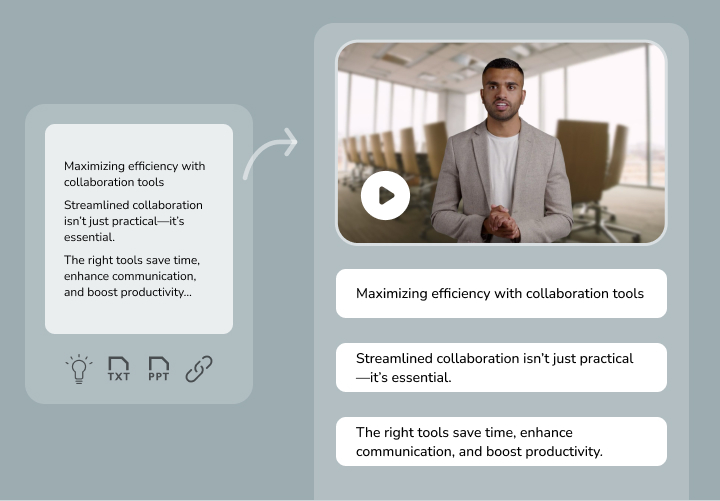
Micro-check #1: Fliki’s FAQ says you apply a discount by choosing “Add Promotion code” during payment from your account billing screen. Micro-check #2: Fliki’s release notes state payments are securely processed by Stripe. This isn’t magic—pricing + policy are the guardrails, so most “savings” come from choosing the right plan and reducing wasted renders. If the checkout template changes, this may change.
Read more
Fliki coupon code status
Let’s start from official pages and keep the hype out of it; screenshots lie, and the subtotal is the only real proof. Fliki doesn’t advertise a single, always-on coupon for every visitor on the public pricing page, so any generic code you see elsewhere should be treated as unverified until it applies in your account.
What Fliki does confirm publicly is more practical: (1) a Free plan (no credit card required) for trying the workflow, (2) an annual-billing discount shown directly on the pricing page, and (3) a documented discount code path for nonprofits and educational institutes via support.
Best for: creators who want fast text-to-video with AI voices, course teams converting scripts into lesson clips, and marketers repurposing blogs into narrated social videos.
Not ideal for: high-end cinematic editing, complex compositing, or teams that need deep real-time collaboration inside the editor.
Check with a professional first if: you’re producing regulated training, handling sensitive data, or your brand has strict legal/compliance review requirements.
Best ways to save (no-code)
Coupons are not a strategy, so use levers you can actually verify and repeat month after month. No magic—just math.
- Use the Free plan to test output: validate voice quality, watermark behavior, and export fit before committing to paid credits.
- Compare monthly vs annual billing: Fliki’s pricing page shows the effective lower per-month price when billed annually.
- Ask about eligibility discounts: if you’re a nonprofit or educational institute, request the official discount code through support instead of guessing.
- Time purchases around known promos: Fliki describes “Double Value Weekends” where credit charges are halved for a limited period when the promo banner is active in your account.
- Reduce re-renders: credits are deducted based on generated audio/video duration, and edits can trigger reprocessing—so lock your script and pacing first.
- Right-size team seats: Fliki’s FAQ explains that adding team members adds subscription cost per member while increasing the shared credit pool.
One more practical angle: if you’re unsure, start monthly and learn your real burn rate, then upgrade to annual only once your output is predictable. Trust the subtotal, not the headline you saw on a coupon page.
To keep credits under control, build a simple “one render” habit: write the full script, run a quick read-through for timing, then finalize pauses and pronunciation before you export. For longer projects, split content into smaller episodes so you can re-render only the changed scene instead of a full 30-minute file. Banners come and go, but a disciplined workflow is the discount you can always keep.
For a quick comparison without hopping between tabs, use this Fliki link and double-check whether you’re viewing monthly or annual pricing before you decide.
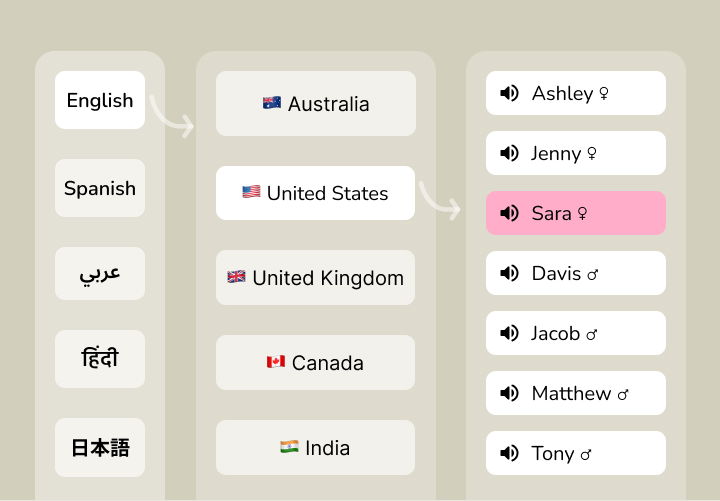
How to apply a promo (steps)
When you have a legitimate offer (support-provided code, nonprofit/edu code, or an in-app promotion), apply it the same way every time so you can confirm it actually reduced the amount due.
- Log in and open your account billing/subscription area.
- Choose Subscribe (or manage your plan) and proceed to the payment step for the plan you want.
- Select Add Promotion code, paste the code exactly, and apply it.
- Confirm the total updates before you complete payment, then keep the confirmation email/receipt for your records.
If you’re learning the product at the same time, a short walkthrough can help you understand the workflow before you pay. This video demonstrates a common “text → scenes → voice → export” flow:
After you apply any code, don’t rush; read what renews, and confirm whether you picked monthly or annual billing so you don’t accidentally lock in a longer term than you intended.
Code fail checklist
If a code won’t apply, it’s usually one of these issues (and the fix is almost always “match the offer rules”):
- Plan mismatch: the code is limited to a specific tier or excludes upgrades/downgrades.
- Billing cadence mismatch: applies only to annual billing (or only to monthly).
- Eligibility restrictions: nonprofit/edu or new-customer-only offers require proof or a specific account type.
- Not stackable: you can’t combine the code with another promo or internal credit promotion.
- Formatting errors: extra spaces, wrong capitalization, or copying hidden characters.
- Expired/paused campaign: promos can be turned off quickly, even if a third-party site still lists them.
When the code fails, fall back to dependable savings: annual pricing, planned output, and fewer re-renders. Start from official buttons, then verify in checkout.
Pricing/bundles + refund/trial reality check
Fliki’s pricing page lists a Free plan ($0) and paid tiers that scale with credits, export limits, and features. As of September 2026, the public page shows Standard at $28/month (or $21/month when billed annually) and Premium at $88/month (or $66/month when billed annually), with Enterprise as custom pricing.
Minutes add up fast.
From the same pricing page, Standard includes credits measured as 2,160 minutes per year, Full HD exports, and “no watermark,” while Premium increases annual credits (7,200 minutes per year) and raises export-length limits along with team-oriented features like multiple brand kits and priority support.
If you’re buying for a small team, price it like seats + output, not like “one shared subscription.” Fliki’s FAQ illustrates that extra team members add a matching subscription charge per person, and the upside is a larger shared credit pool. That can be a bargain when everyone is producing, but it’s expensive if seats sit idle, so don’t pay for idle minutes.
Rule of thumb: if you’re consistently shipping videos every week for at least a couple of months, annual billing usually beats “coupon hunting,” but only after you’ve proven your monthly credit burn is steady.
Refunds are where many people get surprised, so treat policy as part of the price. Fliki’s FAQ says it generally can’t issue refunds once you subscribe to paid plans, and both the FAQ and Terms note that cancelling stops future renewals but doesn’t refund the current period; the Terms also say certain refund requests may be considered case-by-case at the company’s discretion.
I first assumed you could buy one-off extra credits any time, then realized Fliki’s FAQ frames it differently: you typically renew your plan early (after using most of your credits) to refill credits sooner, which also resets your billing date.
Seasonality
If you’re planning purchases around “big sale” dates, keep expectations realistic. Fliki doesn’t publish a fixed public promo calendar on the pricing page, but it does describe an internal limited-time promotion called Double Value Weekends that appears as an in-app banner when active. Beyond that, promos can be tied to product launches, creator events, or periodic campaigns, so the safest approach is to verify offers only when you see them in your account or in an official support reply.
Alternatives
If Fliki’s credit model or feature mix isn’t your fit, compare a few adjacent tools before you commit to annual billing. Math beats hype, and the best tool is the one your team will actually use weekly.
- Pictory: script/blog-to-video workflows aimed at creators repurposing content quickly.
- Lumen5: marketing-friendly templates for turning articles into social videos.
- InVideo: broader video editor plus AI-assisted creation for ads and social.
- HeyGen: avatar-led videos when you need a presenter-style format.
- Synthesia: enterprise-friendly avatar videos and training workflows.
FAQs + operator notes
Q: Is there a verified Fliki coupon code for everyone?
A: As of September 2026, the pricing page doesn’t promote a universal code for all shoppers. The reliable discounts Fliki documents publicly are eligibility-based (nonprofit/education via support) and time-bound in-app promotions, so always confirm the code changes your total before paying.
Q: How do nonprofit or education discounts work?
A: Fliki’s FAQ states it offers a 15% discount for nonprofits and educational institutes and asks eligible users to reach out to support to receive a discount code.
Q: What are Double Value Weekends in Fliki?
A: Fliki’s FAQ describes Double Value Weekends as a limited-time offer where credit charges are halved for a few hours each weekend, and it notes you’ll see a banner in your account when the offer is active.
Q: How do I apply a discount code?
A: Fliki’s FAQ instructs users to go to the account area, start the subscription payment flow, click “Add Promotion code,” apply the coupon, and then proceed with payment.
Q: What’s Fliki’s refund policy on paid plans?
A: Fliki’s FAQ says it generally can’t issue refunds once you’ve subscribed to paid plans, and it reiterates that cancelling ends auto-renewal but does not refund the current period. The Terms also mention refund requests may be considered on a case-by-case basis at the company’s discretion.
Q: Can I get more credits if I run out?
A: Fliki’s FAQ indicates you typically renew your subscription early once you’ve used most of your credits, which refills credits immediately and resets the billing cycle date.
Operator notes: Last checked: September 2026, and here’s what I could confirm on official Fliki pages: plan names and public pricing (Free/Standard/Premium/Enterprise), the annual-vs-monthly discount display, the nonprofit/education discount statement, the in-app “Double Value Weekends” description, the refund/cancellation language, the documented “Add Promotion code” step, and the note that payments are processed by Stripe. Not verified: any third-party “working code” claims, any fixed seasonal promo calendar beyond the described in-app promotions, or Enterprise quote details that require sales contact.