
YouLearn AI coupon code searches usually mean you want Pro features for less, fast. As of August 2026, I couldn’t confirm any public codes on YouLearn’s own pricing and policy pages, so I focus on savings you can verify: student eligibility, plan choice, and the trial/refund window. YouLearn positions itself as an AI tutor for PDFs, YouTube videos, slides, and recorded lectures—so the real “deal” is whether it saves you study time every week. Below you’ll find how to apply a promo if you have one, why codes fail, and the safest ways to pay less.
As of August 2026, a YouLearn AI coupon code isn’t something I can confirm on YouLearn’s own pricing and policy pages—so this guide sticks to repeatable, legit ways to save without gambling on mystery codes. Here’s the boring truth.
You’re a student juggling PDFs, YouTube lectures, and slides before an exam.
You’re a busy professional turning webinars into usable notes between meetings.
You’re a lifelong learner who wants faster takeaways, not extra tabs.
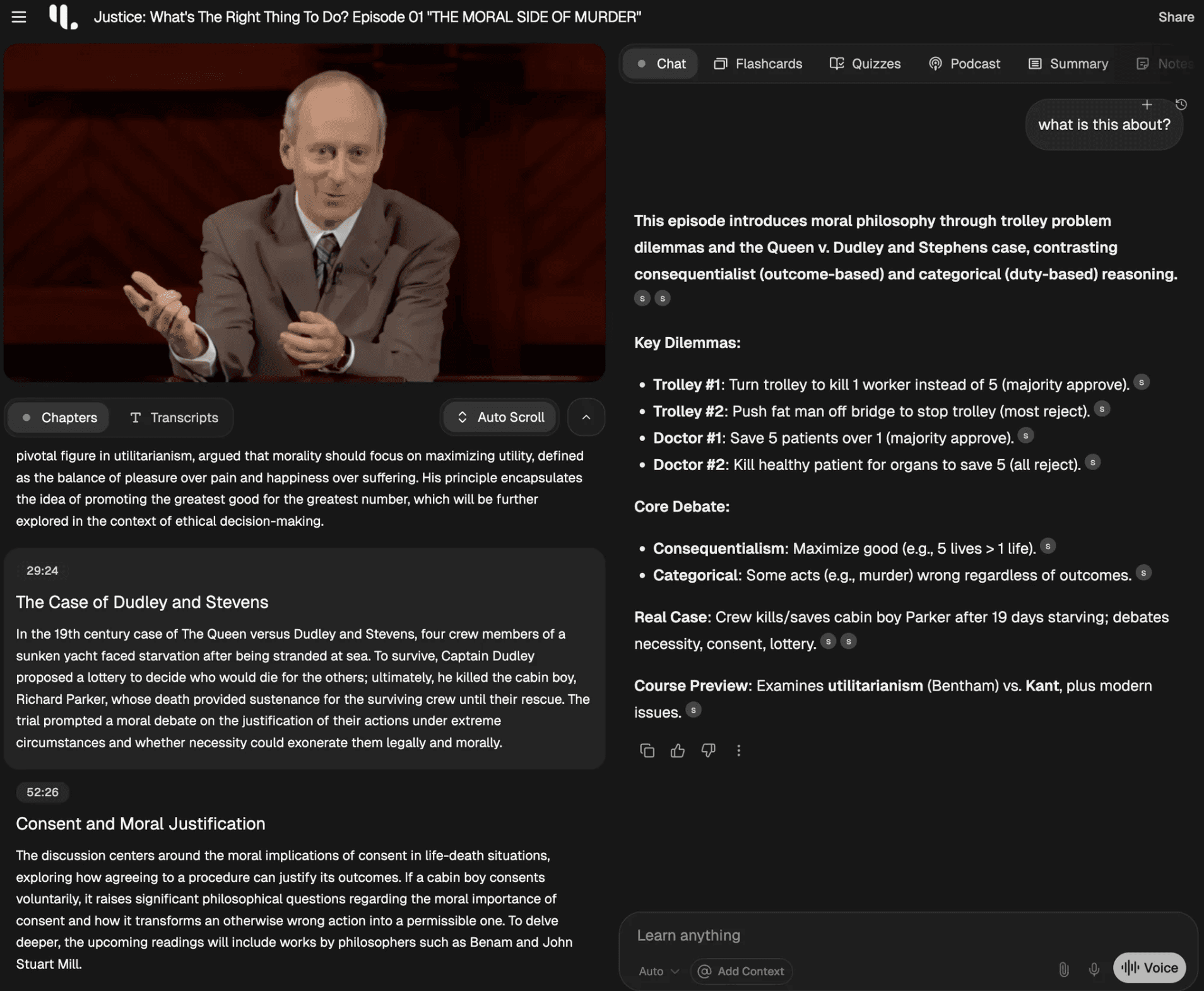
Your checkout may differ depending on region, device, or whether you’re already logged in. This isn’t magic—just math: pricing + policy. Micro-check: YouLearn’s Terms say payments are processed securely through Stripe. Micro-check: the same Terms note that some payment methods are shown or hidden automatically based on your billing country. If the checkout template changes, this may change.
YouLearn AI coupon code status
If you came here hunting a single “working code,” the safest answer is also the least exciting: I couldn’t verify any public, sitewide coupon codes on YouLearn’s official pages as of August 2026. What I could verify are the discounts and policies that are actually written down—like the student discount and the refund window—so you can plan savings you can reproduce. Screenshots lie, so lean on written terms.
Best for: learners who study from mixed inputs (PDFs, YouTube, lecture recordings) and want summaries, quizzes, and an “ask questions” workflow in one place.
Not ideal for: people who only need occasional summaries once a month, or anyone who prefers to keep study materials entirely offline.
Check with a professional first if: you’re using AI outputs for graded work that requires strict citation rules, academic integrity compliance, or regulated/credentialed training.
I first assumed the only discounts would be random coupon codes floating around the internet, then realized YouLearn’s own Terms mention a student discount and a defined refund window.
Start from official buttons.

One more note before we get tactical: a “coupon code” is only valuable if it applies to the plan you actually want and doesn’t fight your billing cycle. If you can’t reproduce it, it’s not real.
Best ways to save (no-code)
Always start from the official buttons inside your account.
The cleanest savings usually come from plan choices, eligibility discounts, and timing—not from typing codes you can’t verify.
- Use the student discount if you qualify: YouLearn states students with a valid .edu email can get a discount on the Pro plan; if your school email doesn’t end in .edu, they say you can contact them for verification.
- Compare annual vs monthly: if you’ll use YouLearn most weeks, annual billing can lower the effective monthly cost; if usage is sporadic, monthly reduces commitment.
- Leverage the free tier first: their Terms describe a Free plan with daily limits, which can be plenty for light use while you test your workflow.
- Watch for referral programs: the official site links to “Invite & Earn,” which usually means you can earn credit by inviting friends; check your account area for the current rules.
- Stack value, not tabs: keep one “Space” per class/project so your summaries, quizzes, and chat stay reusable instead of scattered.
Rule of thumb: if you’ll use an AI tutor four days a week, the paid plan tends to justify itself; if you won’t, squeeze the free tier until it hurts.
One practical tactic is “upgrade for the sprint.” If you have finals, a certification exam, or a dense training month, pay for Pro during the peak, then cancel right after you finish the heavy workload so you don’t forget and roll into another billing cycle.
Discount sites can be noisy, so treat them as rumors unless you can apply the deal on your own account without jumping through weird hoops.
How to apply a promo (steps)
Even when a brand supports promos, the exact placement can vary by device and country, so treat these as “pathways” rather than gospel. Refund windows close fast, so set a reminder if you’re trialing a paid plan.
- Open your account and head to the plan/upgrade page.
- Choose the billing cadence you want (monthly vs annual) before you look for any promo field.
- During checkout, look for a “promo,” “discount,” or “promotion code” field; enter the code and apply it.
- Confirm the total updates in the order summary before you pay.
- Save the receipt email and note your renewal date in your calendar.
Annual plans are where savings usually hide, so always check both billing options before deciding the “deal” is bad.
Code fail checklist
If a code doesn’t work, it’s usually boring reasons—plan targeting, eligibility, or expired promo windows. No magic—just math.
- You selected a different plan tier than the promo targets, so the discount never triggers
- The promo is limited to new accounts, but you’re logged into an existing subscription
- The promo applies only to annual billing, but you chose monthly billing instead
- The code is case-sensitive or includes hidden spaces from copy/paste
- Your cart total does not meet a minimum spend requirement, if one exists
- The offer is geo-limited, and your billing country is outside the eligible region
- You used an ineligible purchase channel, because app-store flows can follow different rules than web checkout
When you troubleshoot, change one variable at a time (billing cycle first, then account eligibility, then device/browser) so you can see what actually fixed it.
Pricing, bundles, and refund/trial reality check
YouLearn describes a Free plan with daily limits and a Pro plan with higher or “unlimited” usage, and it states Pro pricing depends on whether you pay monthly or annually. In their Terms, YouLearn describes Pro as $12 per month when billed annually or $20 per month when billed monthly.
On the policy side, the key details are refreshingly clear: YouLearn’s Terms describe a 7-day free trial, and they also describe a 7-day money-back window for direct web subscriptions (with renewals being non-refundable). That makes it easier to test without guessing, but it also means you should calendar the deadline so you don’t miss the window.
If you’re unsure whether you’ll keep the subscription, treat the trial like a checklist. Upload one lecture, summarize one YouTube video, and run one quiz or practice exam workflow; if those three outputs don’t save you time, the upgrade probably won’t feel worth it in month two.
Make the tool earn its keep every week by setting up one small routine: upload one lecture, generate a summary, then take a short quiz and save the output as study notes.
If you’re ready to compare plans right now, you can start from the deal page at YouLearn AI here and then verify the final price on the official checkout screen.

Seasonality
YouLearn is a study tool, so discounts—when they exist—tend to cluster around predictable moments: back-to-school, midterms/finals, and big retail promo weeks. The catch is that not every brand runs public codes; sometimes the only “seasonal” change is that annual plans look more attractive because you’re using the tool more intensely for a few months.
My practical approach is to check pricing at the start of a semester, then again near major holidays, and otherwise focus on student eligibility and annual/monthly choice. That way you don’t waste time refreshing coupon pages during crunch week, and you still catch the times when brands tend to experiment with promos.
If you do spot a seasonal offer, keep your focus on the final total and the renewal date, because a discount that looks great on day one can feel pricey if you forget to cancel or switch billing cycles later.
Alternatives
If YouLearn doesn’t fit your workflow or budget, these alternatives can cover parts of the same “learn faster from content” job. Pick based on your main input type (PDFs, web articles, or lectures) and how much structure you want around quizzes and notes.
- Google NotebookLM: good for turning your sources into grounded summaries and Q&A, especially if you like citation-style references.
- ChatGPT: flexible for tutoring-style explanations and study plans if you’re comfortable providing your own materials and prompts.
- Perplexity: helpful for research-style exploration with links, especially when you need to cross-check facts quickly.
- Humata: a PDF-first option that focuses on asking questions and extracting answers from documents.
- AskYourPDF: another document-Q&A route when you mainly live inside papers and textbooks.
The trick is matching the tool to the bottleneck: if your problem is “I can’t finish lectures,” prioritize audio/video workflows; if it’s “I can’t extract key points from PDFs,” go document-first.

FAQs + operator notes
Q: Does YouLearn AI offer any student discount for Pro?
A: Yes—its Terms say students with a valid .edu email are eligible for a discount on the Pro plan, and it also notes you can contact them if your student email does not end in .edu.
Q: Do you get a free plan plus a short trial?
A: The Terms describe a Free plan with daily limits, and they also describe a 7-day free trial that provides full access; if you do not cancel before the trial ends, your subscription renews at the regular rate.
Q: What does the official refund policy say?
A: For direct web subscriptions, the Terms describe a 7-day money-back window for first payments, while renewals are described as non-refundable. App Store purchases follow Apple’s own refund rules.
Q: Can you cancel whenever you want to?
A: The Terms state you can cancel through your account settings and that access continues until the end of the current billing period, with no partial refunds for unused time.
Q: What kinds of materials can YouLearn handle?
A: The official site positions YouLearn as an AI tutor that works with materials like PDFs, YouTube videos, slides, and recorded lectures, turning them into notes, chats, and quizzes.
Q: Will uploads be processed by third-party AI providers?
A: The Privacy Policy states that, depending on the feature, your uploaded content and chats may be processed by third-party AI and speech providers to generate outputs, and it lists several major model vendors as examples.
Operator notes: Last checked: August 2026 and reviewed the official Terms, Privacy Policy, and key product pages. Verified: Free-plan limits, Pro pricing structure, student discount language, trial/refund/cancellation policy language, and the general product positioning (PDF/YouTube/lectures). Not verified: any specific coupon code strings from third-party coupon sites, any “limited-time” discount claims, or the exact placement of a promo-code field in checkout because the pricing/affiliate flows are heavily dynamic and can differ by account.