
NiceJob coupon code searches usually mean you want a discount you can actually verify at checkout, not a random “working code” list. As of September 2026, NiceJob’s official pricing shows a 14-day free trial with no credit card up front, and the most dependable savings often come from partner or referral offers that are applied automatically (no code needed). This page covers what’s verifiable: current plan pricing, how to apply a promo cleanly if you receive one, and what cancellation timing means in practice. Start from the official buttons, then confirm your final total before you subscribe.
As of September 2026, a NiceJob coupon code is best treated like a checksum: if your total does not change on the final screen, it is not a real discount. Your checkout may differ. This isn’t magic… pricing + policy. No magic, just math. You might be a home-service owner trying to turn invoices into Google reviews automatically. You might be a studio or clinic manager who wants steady ratings without extra admin time. You might be an agency that needs a repeatable playbook across multiple client accounts.
Micro-check #1: on NiceJob’s official pricing page, the software plan cards show Reviews at $75/month (USD) and Pro at $125/month (USD), alongside a 14-day free trial with no credit card up front. Micro-check #2: in the Terms, cancellation is only valid once you receive a cancellation confirmation, and they describe canceling by email (support@nicejob.co) or via in-app cancellation notice. I first assumed a public coupon field would be the main lever, then realized the most consistent savings are partner/referral intro discounts and simply choosing the right plan tier. If the checkout template changes, this may change.
NiceJob coupon code status
NiceJob is reputation marketing software that helps small businesses automate review requests, publish social proof, and (on the Pro tier) layer in additional automation such as referrals, repeat bookings, gifting, and AI replies. When someone searches “NiceJob coupon code,” they usually want one of two things: a pasteable code that lowers the bill, or a trusted way to start cheaper while they test whether the platform fits.
Here’s the boring truth, with verifiable guardrails. NiceJob does not present a single universal “always-on” coupon code on the main pricing page, but it does run partner and referral offers that apply without a coupon string. For example, certain partner landing pages explicitly advertise 50% off for the first 2–3 months with “no coupon code required,” and the help center describes a referral discount that applies when someone signs up via a referral link.
Best for: local businesses that want an automated review engine tied to real customer events (job completed, invoice paid, appointment closed), plus simple widgets to show reviews on the website.
Not ideal for: teams that already have a mature review acquisition process and only want a lightweight inbox for replies, or anyone expecting a “one-click” reputation overhaul with no operational follow-through.
Check with a professional first if: you operate in a regulated industry and need guidance on review request language, incentive compliance, and data handling requirements in your region.
Receipts beat random codes. When you do see an offer, treat it as legitimate only if it is presented on an official NiceJob domain or an official help article, and only if it is reflected in the total you are about to authorize.
Best ways to save (no-code)
Most savings with NiceJob come from avoiding the “wrong buy” rather than hunting for a magical string of letters. Start from official buttons every time, and treat the first two weeks as a structured trial period, not a casual browse.
Rule of thumb: if your main goal is “more reviews with less effort,” start with Reviews; if you also want repeat booking reminders, referrals, gifting, and deeper competitor insights, start with Pro and prove you will use those modules every week.
- Use the 14-day free trial as your decision window: the pricing page states the trial is 14 days and you do not need a credit card up front, which makes it the cleanest way to validate fit before paying.
- Check partner and referral discounts first: NiceJob documents introductory discounts on some partner pages and in referral program materials, and those offers typically apply without you needing to paste a coupon.
- Choose the plan that matches your workflow now: paying for Pro is wasteful if you will not use referrals, repeat reminders, gifting, AI replies, or competitor insights; similarly, staying on Reviews can be limiting if you are already ready to automate those actions.
- Skip add-ons until you can justify them: NiceJob Sites is priced separately and includes a setup fee, and the pricing FAQ lists additional one-time and monthly costs for extra landing pages or CMS modules.
Test it before scaling. If you want a straightforward starting point, you can begin via this NiceJob deal link and then verify the same pricing and trial terms on the official pricing page before you proceed.
How to apply a promo (steps)
NiceJob offers are often link-based rather than “paste-a-code” based, so the cleanest workflow is to start from the offer link, confirm it is on an official NiceJob domain, and then verify the totals inside your account area before you pay.
- Open the official pricing page first and decide whether Reviews or Pro matches your goals and daily workflow.
- If you have a partner or referral offer link, open it in a new tab and confirm it clearly states the discount and duration.
- Create your account and start your free trial so you can validate integrations, campaigns, and review site connections.
- When you are ready to subscribe, proceed to the billing screen and confirm the discount is reflected in the total you are authorizing.
- Save the confirmation email and note your billing date, which the pricing FAQ explains is tied to the end of your 14-day trial.
If you are not seeing the discount in the final total, treat that as the answer for that offer path, and switch to the plan-based decision instead of trying random codes.
Code fail checklist
When a coupon fails, it is almost always eligibility, timing, or the wrong purchase path. Use this checklist once, cleanly, and then stop wasting time.
- You are using a third-party “coupon code” list that is not referenced on an official NiceJob page, and your total never changes.
- You are on the standard pricing route, but the discount is attached to a partner or referral link and must be activated by signing up through that link.
- The offer is limited to new accounts, or limited to a specific integration partner landing page, and your account does not qualify.
- You expected a discount on NiceJob Sites, but the offer you found applies only to the core software subscription.
- You started the checkout in an older tab and the offer window changed, so your session no longer reflects the current promotion.
- You are expecting stacking behavior, but most checkouts apply a single promotion at a time, especially for introductory offers.
If you want the simplest truth test, confirm the final number you are about to authorize, and treat anything else as marketing noise.
Pricing/bundles + refund/trial reality check
NiceJob’s published pricing is straightforward on the official pricing page, with two core software tiers plus an optional Sites add-on. As of September 2026, the list prices shown are Reviews at $75/month (USD) and Pro at $125/month (USD). The same page presents NiceJob Sites at $99/month plus a $199 setup fee, and the pricing FAQ lists additional costs for extra landing pages or CMS modules for Sites customers.
Trials and billing are also explicit on the pricing page. The marketing header states a 14-day free trial with no credit card up front, and the FAQ explains your billing date will be the day your trial ends. It also lists accepted payment methods as major credit cards.
Refund expectations are where people often get surprised, so it is safer to talk about what is verifiable: cancellation mechanics. NiceJob’s Terms state you can cancel prior to the end of the current monthly term by written or in-app notice, and that no cancellation is valid until you receive a cancellation confirmation. In practical terms, that means you should schedule cancellations a few days before the renewal boundary and keep the confirmation email or in-app confirmation for your records.
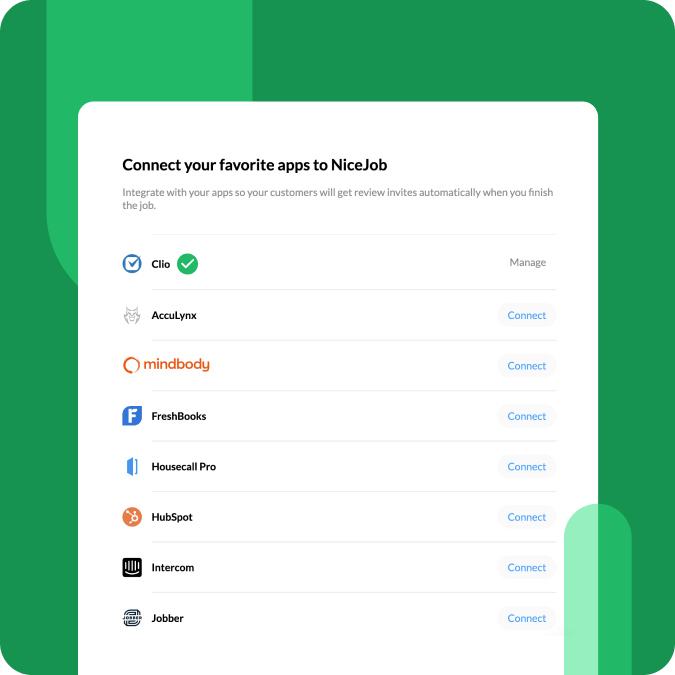
Here is the operational way to avoid overspending: spend the first week of the trial connecting your review profiles and one “source of truth” system for contacts, then spend the second week evaluating whether your review request cadence and follow-up reminders are producing measurable review volume.
Seasonality
NiceJob promotions tend to show up around predictable windows, but the safest way to think about seasonality is to look for official messages rather than rumor codes. NiceJob’s own resource content has highlighted Black Friday promotions in the past, including a campaign where they described “pay what you want” access for two months during Black Friday season.
Partner and referral offers can also function like evergreen “seasonality,” because they may be available whenever you sign up through the correct partner path. If you are timing a purchase, the most practical move is to start your free trial when you are actually ready to implement, so you do not waste the 14-day window.
Alternatives
If NiceJob is not the right fit, the best alternative depends on whether you care most about review generation automation, inbox/reply management, social proof widgets, or broader local marketing automation. These options are commonly compared in the reputation marketing space:
- Podium: messaging-first customer interaction platform with review collection and payments for some businesses.
- Birdeye: broader reputation management suite with listings, reviews, and messaging in higher tiers.
- Grade.us: review marketing workflows that many agencies use for multi-client operations.
- GatherUp: review and customer experience tooling that emphasizes feedback workflows and reporting.
- Trustpilot (category dependent): stronger in ecommerce and online trust signals, but not always ideal for local service workflows.
Compare alternatives by running one identical test: connect the same review sites, import the same customer list, run one campaign, and measure (a) deliverability, (b) review completion rate, and (c) how easy it is to publish social proof back onto your website.

FAQs + operator notes
Is there a working NiceJob coupon code right now?
As of September 2026, I did not find a single universal “always-on” coupon code on the official pricing page. The most verifiable discounts are partner or referral intro offers that apply via the correct link path and show up in your final total.
How much does NiceJob cost?
As of September 2026, the official pricing page lists Reviews at $75/month (USD) and Pro at $125/month (USD), with an optional NiceJob Sites add-on priced at $99/month plus a $199 setup fee.
Does NiceJob offer a free trial?
Yes. The pricing page states a 14-day free trial with no credit card required up front, which is the cleanest way to test your workflow before subscribing.
What discounts can I verify without guessing?
Official partner landing pages and referral program materials describe introductory discounts (often framed as a percentage off for the first 2–3 months) with no coupon code required, provided you sign up through that partner or referral path.
How do I cancel, and what should I save?
The Terms explain you can cancel by written notice (including email) or in-app notice prior to the end of the current monthly term, and that cancellation is not valid until you receive a cancellation confirmation. Save that confirmation so you can reconcile billing later.
Should I start on Reviews or Pro?
Start with Reviews if your main objective is review generation plus social proof display. Choose Pro when you will actually use the extra automation like referrals, repeat reminders, gifting, AI replies, and competitor insights in a weekly operating rhythm.
Operator notes: Last checked: September 2026. Verified on official NiceJob pages: trial terms (14 days, no credit card up front), current list pricing for Reviews and Pro, NiceJob Sites price and setup fee, and pricing FAQ items including billing date timing and accepted credit cards. Verified on official NiceJob materials: partner/referral discount language indicating introductory discounts may apply via specific partner or referral links. Verified on the Terms page: cancellation timing requirements and the requirement that cancellation is only valid upon confirmation. Not verified: any third-party coupon strings, any “sitewide” discounts claimed on coupon directories, or the exact placement of any promo-code input field across every possible checkout variation.